Change Account Settings
The Settings area provides an interface for personalizing the look and function of TrialDirector 360. Anything can be customized from color schemes to aliases.
As an administrator, the you can use Settings to manage the other team members on the subscription.
To change your account settings, navigate to TrialDirector 360 and follow the steps below:
-
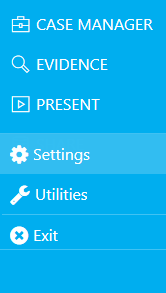
Click Settings from the menu on the left.
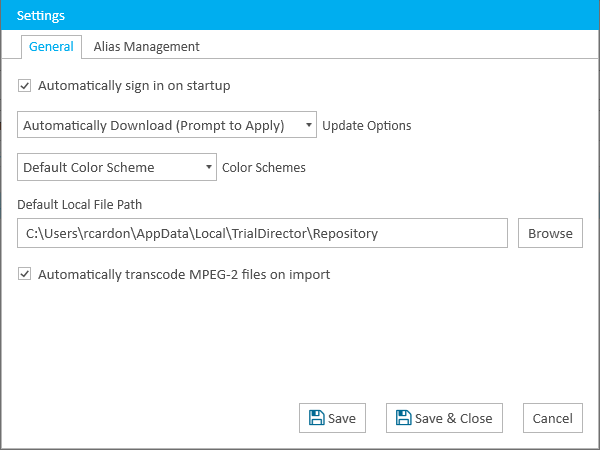
The Settings window appears.
-
Select the tab with corresponding settings for the desired changes.
- Change the setting in the tab.
- Click Save.
There are many settings that can be modified. Expand the options below to see the options available in each tab.
|
Automatically sign in on start up
|
When this option is selected, when TrialDirector 360 initiates, it will automatically sign in using the credentials entered on the account.
|
|
Update Options
|
Use the options in the dropdown to decide what to do when TrialDirector 360 updates arrive.
|
|
Color Schemes
|
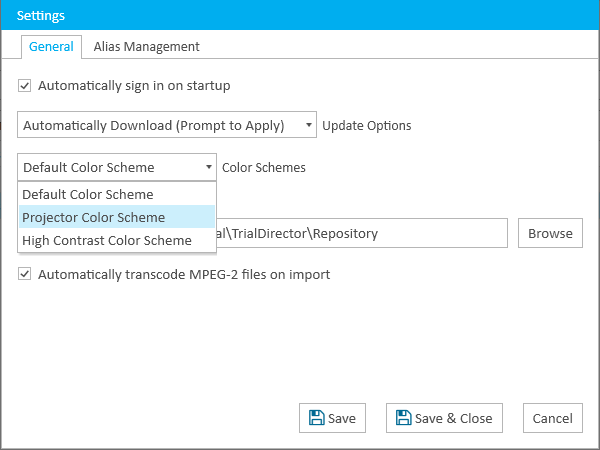
Choose from these options to change the color scheme of TrialDirector 360:
-
Default Color Scheme - Color scheme changes to Pantone Proc Cyan C
-
Projector Color Scheme - Color scheme alters to appear appropriately on a projector
-
High Contrast Color Scheme - Color Scheme changes to be more readable between text and background

|
Note: Ensure the system is set to high contrast as well. If not, all the elements may not appear correctly in the application. Click here for more details.
|
|
|
Default Local File Path
|
The Default Local Repository location is where all of the files are stored locally on the system.
|
|
Default Network Folder Path
|
The default network repository location where all of the files are stored on the network.
|
|
Automatically transcode MPEG-2 files on import
|
When checked, any MPEG-2 files will automatically be converted to MPEG-4 files during the import process. It is strongly recommended that you leave this box checked.
|
 General