Use Issue Applicator Shortcuts
You can use keyboard shortcuts when applying issue types to a transcript to speed up the issue type application process.

|
Note: Ensure text is selected within a transcript for all the keyboard shortcuts to be available. For more information, view the Apply an Issue to a Transcript article. |
The following hotkeys are available when applying issue types to a transcript:
|
Action |
Definition |
|
Issue Type Shortcut |
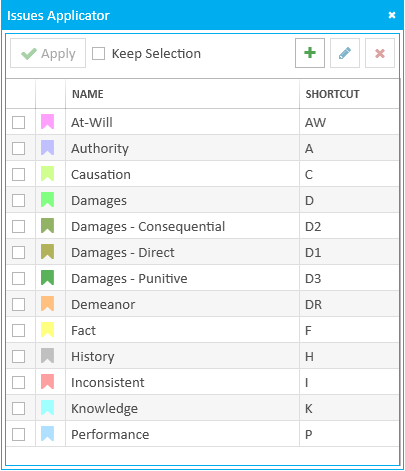
Each issue type has a keyboard shortcut associated with it.
To use an issue type's keyboard shortcut, ensure a transcript and the Issue Applicator are open. Select text in the transcript, type in the issue type's shortcut, then press Enter on the keyboard. |
|
Up and Down Arrow Keys |
Use the Up and Down arrow keys to cycle the highlight through the issue types in the Issue Applicator. |
|
Spacebar Key |
Use the Spacebar key to select a highlighted issue type in the Issue Applicator. |